

In today’s fast-paced world, efficiently managing information from meetings and video calls is crucial. That’s where our new AI Assistant comes in – a game-changer application designed to convert your video calls into neatly organized Notion notes.
Concept and Functionality
The AI Assistant is an innovative application that streamlines the note-taking process, especially for professionals and students who juggle multiple meetings or lectures. It’s not just a tool; it’s your personal meeting assistant, ensuring that no critical point is missed.
How Does the AI Assistant Work?
- Video to Audio: First, the app uses the MoviePy library to convert your video file (“.mp4”) into an audio format, ensuring that the subsequent steps are optimized for audio processing.
- Audio to Text: Leveraging OpenAI’s Whisper, our app transcribes the audio file accurately. This step is crucial in capturing every word spoken during the meeting.
- Text to Summary: Here’s where the magic happens. The app utilizes Large Language Models to provide a succinct summary of the meeting, including key bullet points, follow-up actions, and other discussion topics. Additionally, sentiment analysis offers an emotional context to the conversation.
- Summary to Notion: Recognizing the popularity of Notion for note-taking, the app seamlessly integrates with Notion’s API. This step translates the summarized notes into a format that’s easily accessible and editable within Notion.
Example Output
Based on the fireship video https://www.youtube.com/watch?v=CDokUdux0rc This is the notion output:
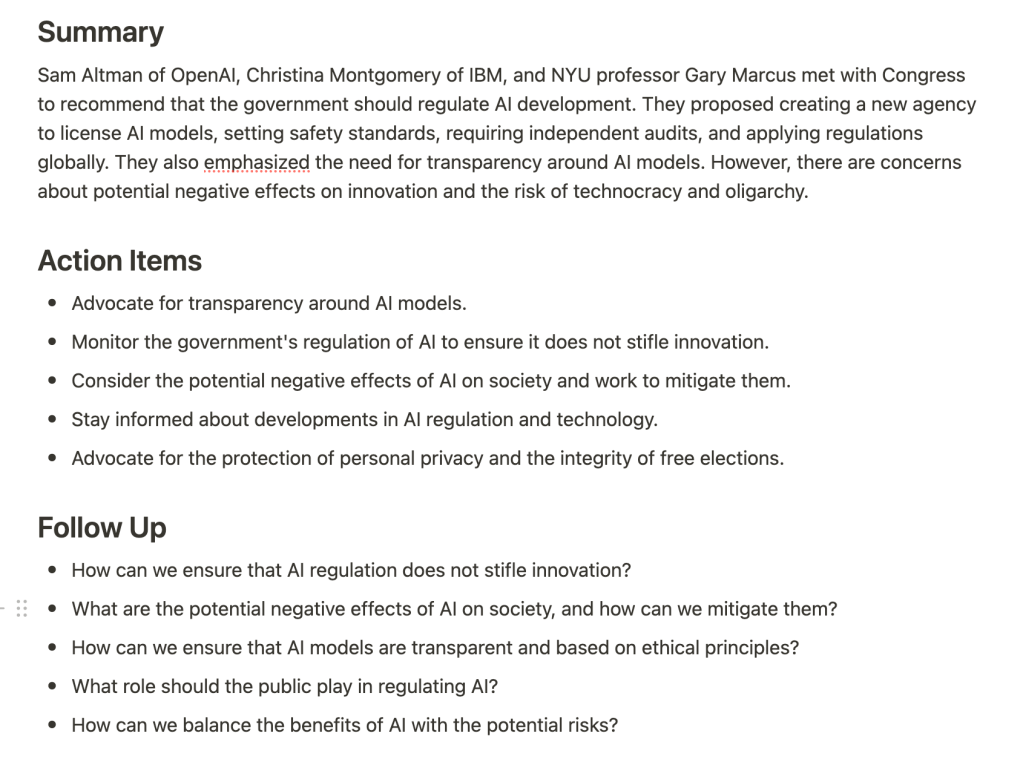
Technical Setup and Configuration
To get started, users will need to set up their environment with API keys and configure the path to their Notion pages. The app’s stack includes:
- Python Whisper (local, not API)
- OpenAI API
- Notion API
- Flask
- MoviePy
Tailoring to Your Needs
While we’ve designed this app with Notion integration, its versatile architecture allows for adaptation to other markdown language applications with API endpoints.
Conclusion
The AI Assistant is more than just an app; it’s a solution to enhance productivity and information management. By bridging the gap between video calls and digital notes, it empowers users to focus more on the discussion and less on note-taking.
Code
All related code is in https://github.com/Jose-Sabater/AI-Assistant-Whisper-ChatGPT-Notion
"""
Create a Class that takes in a video file and creates a Notion page out of it
Steps:
1. Convert video to audio
2. Transcribe audio to text
3. Summarize text
4. Create Notion page

You dont need to go through all the steps, you can just call the function that you want to use
"""
import logging
from datetime import datetime
from video_to_audio import convert_video_to_audio
from transcribe import transcribe_audio
from text_to_summary import summarize
from summary_to_notion import NotionPageBuilder
import os


class NotionPageError(Exception):
    """Raised when Notion page cannot be created"""

    pass


logging.basicConfig(level=logging.INFO)


class NotesAssistant:
    """Creates a Notion page out of a video file, using the following steps:

        1. Convert video to audio (using MoviePy library)
        2. Transcribe audio to text (using whisper library)
        3. Summarize text (using OpenAI API)
        4. Create Notion page (using Notion API)
    Usage: NotesAssistant(video_path="./videos/test_video.mp4")

    Methods:
        video_to_audio: Converts a video file to an audio file
        audio_to_text: Creates a transcript out of an audio file
        text_to_summary: Creates a summary out of a transcript
        summary_to_notion: Creates a Notion page out of a summary

    Notes:
    You dont need to go through all the steps, you can just call the function that you want to use

    Attributes:
        video_path: Path to the video file
        audio_file_path: Path to the audio file
        transcript_path: Path to the transcript file
        summary_path: Path to the summary file
    """

    def __init__(self, video_path: bool = None):
        self.video_path = video_path

    def video_to_audio(
        self,
        video_file: bool = None,
        save_audio: bool = True,
        save_path: str = "./audio_files",
        output_ext: str = "mp3",
    ):
        """Converts a video file to an audio file using MoviePy library"""
        if video_file is None:
            video_file = self.video_path
        audio_file_path, audio = convert_video_to_audio(
            self.video_path,
            save_audio=save_audio,
            save_path=save_path,
            output_ext=output_ext,
        )
        self.audio_file_path = audio_file_path
        return audio_file_path

    def audio_to_text(
        self,
        audio_file=None,
        selected_model="small.en",
        save_transcript: bool = True,
    ):
        """Creates a transcript out of an audio file using whisper library"""
        if audio_file is None:
            audio_file = self.audio_file_path

        transcript_path, raw_text = transcribe_audio(
            audio_file, save_transcript, selected_model
        )
        self.transcript_path = transcript_path
        return transcript_path

    def text_to_summary(
        self,
        transcript: None,
        model: str = "gpt-3.5-turbo-0301",
        save_summary: bool = True,
    ):
        """Creates a summary out of a transcript using OpenAI ChatGPT API"""
        if transcript is None:
            transcript = self.transcript_path
        summary_path = summarize(transcript, model=model, save_summary=save_summary)
        self.summary_path = summary_path
        return summary_path

    def summary_to_notion(self, summary: None):
        """Creates a Notion page out of a summary using Notion API"""
        if summary is None:
            summary = self.summary_path
        try:
            page = NotionPageBuilder(summary)
        except Exception as e:
            raise NotionPageError(f"Could not create Notion page. Error: {e}") from e

        try:
            page.create_page()
        except Exception as e:
            raise NotionPageError(f"Could not create Notion page. Error: {e}") from e
        logging.info("Notion page created successfully")


def main():
    logging.basicConfig(
        level=logging.INFO, format="%(asctime)s %(levelname)s %(message)s"
    )
 José Sabater
Leave a comment